小程序整理–如何动态添加picker
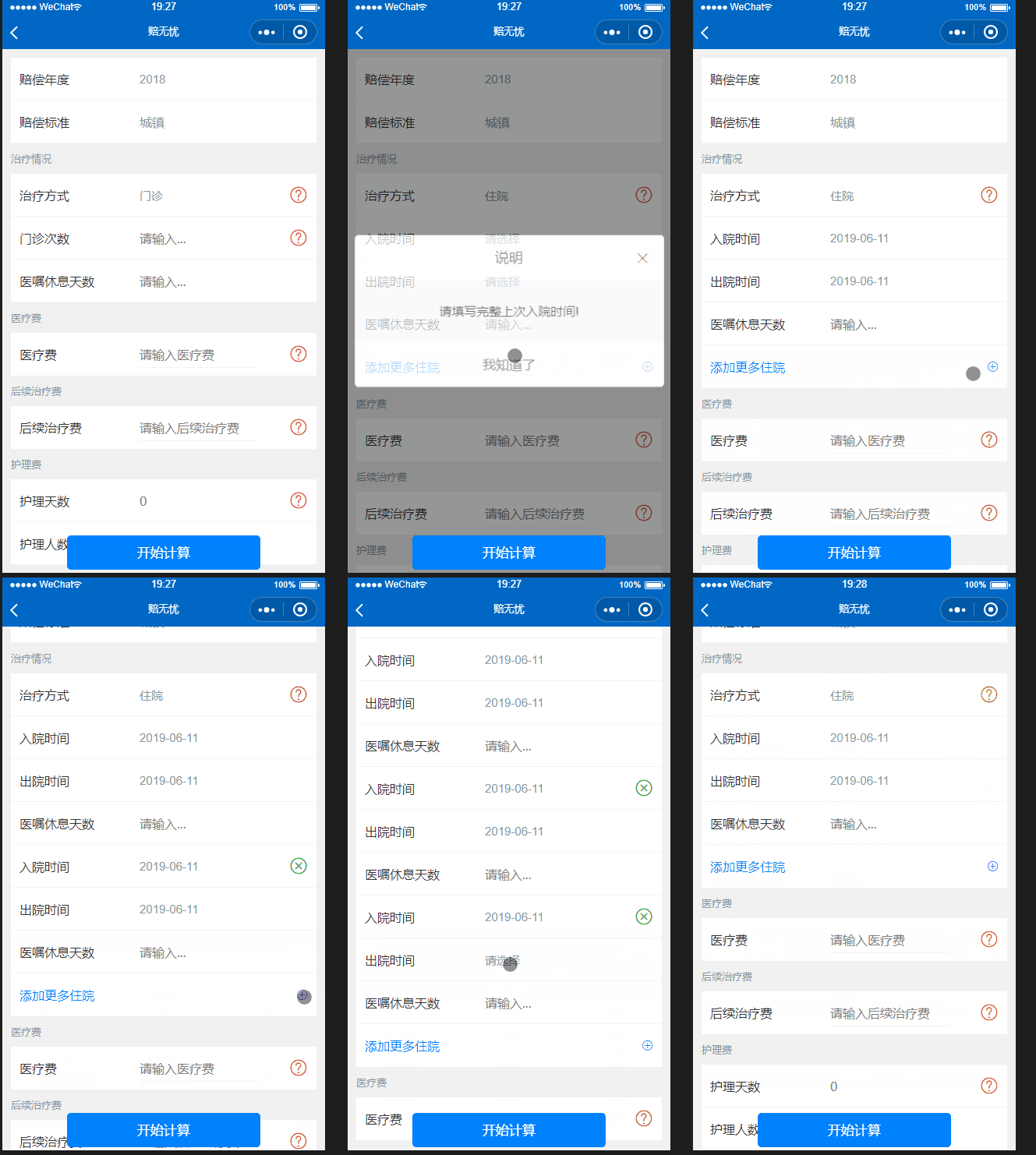
最近在做一个计算颇为复杂的小程序,从上图可以看到,实现了动态增删picker,并且每次的值都有获取和判断。
思路
用一个数组。for循环显示,并在view上 data-ind 绑定索引,在点击事件时候,获取索引,对其增删改。(这里是自带的时间picker 所以不用判断 range里的数组变化。下面会有例子说明,其实原理一样。)
过程
js数据 medicalItem: [{date1:‘请选择’, date2: ‘请选择’ }] for循环,date1 date2为入院时间和出院时间
方法addMedical 添加数据,每次判断数组最后一条数据的date1 、date2 是否为“请选择”,即可判断是否已经选择时间。
bindDate 为picker的绑定事件,通过e.currentTarget.dataset.ind来获取数组的序列,data-filed 来获取是哪个字段 给对应的数组下标中的某个字段赋值。
OK!一切都明白了。以下就是代码部分。
wxml 代码如下:
1
2
3
4
5
6
7
8
9
10
11
12
13
14
15
16
17
18
19
20
21
22
23
24
25
26
27
28
29
30
31
32
33
34
35
36
37
38
39
40
41
42
43
44
45
46
47
48
| <block wx:for="{{medicalItem}}" wx:key>
<view class="cu-bar input margin-lr-sm solid-bottom ">
<view class="action width-xs ">
<text class="text-black">入院时间</text>
</view>
<picker mode='date' bindchange="bindDate" data-index="{{index}}" data-filed='date1' value="{{item.date1}}" start="1995-10-25" end="{{toDay}}" class='text-gray width-sm'>
<view class='flex justify-between'>
{{item.date1}}
</view>
</picker>
<view class=' text-green text-xxl' wx:if="{{index!=0}}" bindtap='closeMedical' data-index='{{index}}'>
<text class='icon-roundclose'></text>
</view>
<view class=' text-red text-xxl' wx:if="{{index==0}}" style='visibility:hidden'>
<text class='icon-question'></text>
</view>
</view>
<view class="cu-bar input margin-lr-sm solid-bottom ">
<view class="action width-xs ">
<text class="text-black">出院时间</text>
</view>
<picker mode='date' bindchange="bindDate" data-index="{{index}}" data-filed='date2' value="{{item.date2}}" start="1995-10-25" end="{{toDay}}" class='text-gray width-sm'>
<view class='flex justify-between'>
{{item.date2}}
</view>
</picker>
<view class=' text-red text-xxl' style='visibility:hidden'>
<text class='icon-question'></text>
</view>
</view>
<view class="cu-bar input margin-lr-sm solid-bottom ">
<view class="action width-xs ">
<text class="text-black">医嘱休息天数</text>
</view>
<input class='width-sm' placeholder='请输入...' focus="{{false}}" data-ind='{{index}}' bindinput='zyInput' type="number" maxlength="300" cursor-spacing="10"></input>
<view class=' text-red text-xxl' style='visibility:hidden'>
<text class='icon-question'></text>
</view>
</view>
</block>
<view class="cu-bar text-blue input margin-lr-sm flex justify-between " bindtap='addMedical'>
<view class="action width-sm ">
<text class="text-blue">添加更多住院</text>
</view>
<text class='icon-roundadd'></text>
</view>
|
js 代码如下:
1
2
3
4
5
6
7
8
9
10
11
12
13
14
15
16
17
18
19
20
21
22
23
24
25
26
27
28
29
30
31
32
33
34
35
36
37
38
39
40
41
42
43
44
45
| data:{
medicalItem: [{
date1: '请选择',
date2: '请选择'
}],
}
addMedical() {
let item = this.data.medicalItem;
if (item[item.length - 1].date1 == '请选择' || item[item.length - 1].date2 == '请选择') {
this.setData({
modalContent: '请填写完整上次入院时间!',
modal: true,
})
} else {
item[item.length] = {
date1: '请选择',
date2: '请选择'
}
this.setData({
medicalItem: item
})
}
},
closeMedical(e) {
let ind = e.currentTarget.dataset.index;
let item = this.data.medicalItem;
item.splice(ind, 1);
this.setData({
medicalItem: item
})
},
bindDate(e) {
let item = this.data.medicalItem;
let day = 0;
item[e.currentTarget.dataset.index][e.currentTarget.dataset.filed] = e.detail.value;
this.setData({
medicalItem: item,
})
},
|
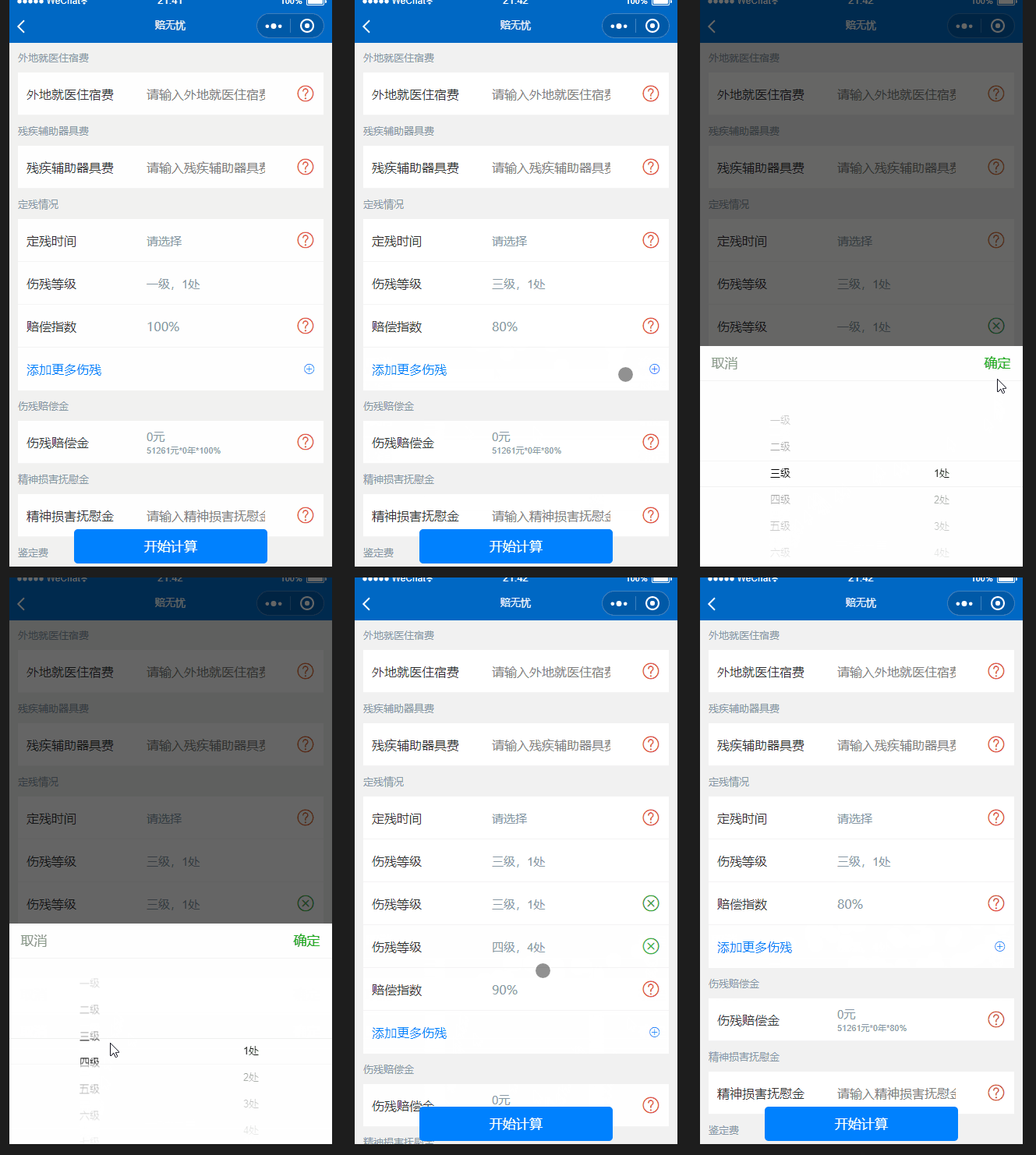
这个就比上个复杂了很多计算, 这我项目中才用到的,我这里就不说明了,我就来说明一下如何实现自定义的picker数据的时候动态添加,获取值用来计算。
思路
用一个数组。for循环显示,并在view上 data-ind 绑定索引,在点击事件时候,获取索引,对其增删改。思路是没变,但是过程变了。这里我要循环的不是数据了,而是我要picker里的多列里的下标。
过程
js数据 //定残 disableArry: [ [‘一级’, ‘二级’, ‘三级’, ‘四级’, ‘五级’, ‘六级’, ‘七级’, ‘八级’, ‘九级’, ‘十级’], [‘1处’, ‘2处’, ‘3处’, ‘4处’, ‘5处’, ‘6处’, ‘7处’, ‘8处’, ‘9处’, ‘10处’, ] ],
disableIndex: [[0, 0]],
picker 里range里的数组是disableArry; 但是我for循环的是disableIndex,disableIndex:里是一个数组,每个元素为对应的picker 中range的下标。
依旧是data-index里存放索引,多列bindchange里是获取一个数组,格式就是[第一列的index,第二列的index]。添加到disableIndex:里。
OK!多说无益思路大同小异。以下就是代码部分。可以忽略我计算的相关代码。理解如何动态添加和获取就可以了。
wxml 代码如下:
1
2
3
4
5
6
7
8
9
10
11
12
13
14
15
16
17
18
19
20
21
22
23
24
25
26
27
28
29
30
31
32
33
34
35
36
37
38
39
40
41
42
43
44
45
46
47
48
49
50
| <view class='text-sm margin-sm text-gray '>
定残情况
</view>
<view class="cu-bar input margin-lr-sm solid-bottom ">
<view class="action width-xs ">
<text class="text-black">定残时间</text>
</view>
<picker mode='date' bindchange="binddisabledate" value="{{disabledate}}" start="1995-10-25" end="{{toDay}}" class='text-gray width-sm'>
<view class='flex justify-between'>
{{disabledate}}
</view>
</picker>
<view class='text-red text-xxl' bindtap='showModal' data-ind='11'>
<text class='icon-question'></text>
</view>
</view>
<block wx:for="{{disableIndex}}" wx:key>
<view class="cu-bar input margin-lr-sm solid-bottom ">
<view class="action width-xs ">
<text class="text-black">伤残等级</text>
</view>
<picker mode="multiSelector" data-index="{{index}}" bindchange="bindMultiPickerChange" bindcolumnchange="bindMultiPickerColumnChange" value="{{item}}" range="{{disableArry}}" class='text-gray width-sm'>
<view class='flex justify-between'>
{{disableArry[0][item[0]]}},{{disableArry[1][item[1]]}}
</view>
</picker>
<view class=' text-green text-xxl' style='visibility:{{index==0?"hidden":"visible"}}' bindtap='closeDisable' data-index='{{index}}'>
<text class='icon-roundclose'></text>
</view>
</view>
</block>
<view class="cu-bar input margin-lr-sm solid-bottom ">
<view class="action width-xs ">
<text class="text-black">赔偿指数</text>
</view>
<input class='width-sm text-gray' disabled='{{true}}' value='{{constParam.disable.text}}' focus="{{false}}" maxlength="300" cursor-spacing="10"></input>
<view class=' text-red text-xxl' bindtap='showModal' data-ind='12'>
<text class='icon-question'></text>
</view>
</view>
<view class="cu-bar text-blue input margin-lr-sm flex justify-between " bindtap='addDisable'>
<view class="action width-sm ">
<text class="text-blue">添加更多伤残</text>
</view>
<text class='icon-roundadd'></text>
</view>
|
js 代码如下: disableCount为我计算函数。可以忽略不看。
1
2
3
4
5
6
7
8
9
10
11
12
13
14
15
16
17
18
19
20
21
22
23
24
25
26
27
28
29
30
31
32
33
34
35
36
37
| data:{
disableArry: [
['一级', '二级', '三级', '四级', '五级', '六级', '七级', '八级', '九级', '十级'],
['1处', '2处', '3处', '4处', '5处', '6处', '7处', '8处', '9处', '10处', ]
],
disableIndex: [
[0, 0]
],
}
bindMultiPickerChange: function(e) {
let item = this.data.disableIndex;
item[e.currentTarget.dataset.index] = e.detail.value;
this.disableCount(item);
},
addDisable: function(e) {
let item = this.data.disableIndex;
item[item.length] = [0, 0];
this.setData({
disableIndex: item,
"constParam.disable": {
text: '100%',
value: 1,
}
})
},
closeDisable: function(e) {
let item = this.data.disableIndex;
item.splice(e.currentTarget.dataset.index, 1);
this.disableCount(item);
},
|
好了。以上就是我最近做的比较复杂的一个picker的动态添加获取。
有了思路和想法去做,一切都会变的简单了。